
Before You Buy Another AI Tool, Map the Workflow
Buying an AI tool is easy. Knowing whether it solves the right problem is harder. That is where many teams get stuck. They see a workflow problem and jump straight to software.
The quoting process is slow. The proposal process is messy. The team keeps rewriting the same content. Source documents are scattered. One person knows where everything lives. Everyone is asking whether AI can “just help with this.”

Maybe it can. But before the team buys another subscription, books a demo, or asks someone to “look into AI options,” it should do one thing first: Map the workflow.
Not the ideal workflow. Not the version in someone’s onboarding doc from three org charts ago. The real workflow.
Who does the work?
Where does it start?
Where does it slow down?
What source material does it depend on?
What gets reviewed?
What gets approved?
Where do people use workarounds?
Where does quality depend on one person’s memory?
That is where better AI decisions start.
AI Does Not Fix a Workflow It Does Not Understand
AI tools can be useful. They can draft, summarize, retrieve, classify, organize, recommend, and automate. Used well, they can save time and reduce repetitive work. But AI is not a magic layer you sprinkle over operational confusion.
If the workflow is unclear, the tool inherits that confusion.
If source materials are outdated, the tool may retrieve outdated information.
If ownership is unclear, no one knows who maintains the system.
If review steps are informal, outputs may move forward without accountability.
If the process changes depending on who is doing it, automation will be hard to scope.
That is why workflow mapping matters. It helps the team understand what is actually happening before deciding what kind of AI support makes sense.
The goal is not to slow down adoption. The goal is to avoid buying software that becomes one more thing the team has to explain, manage, and quietly avoid. A classic workplace relic. Right next to the “temporary spreadsheet” from 2019.
Start With the Work, Not the Tool
A tool-first conversation usually sounds like this: “Should we use ChatGPT?” “Should we build a custom assistant?” “Should we automate this?” “Should we buy a proposal tool?” “Should we connect this to our CRM?” “Can AI make this faster?”
Those are not bad questions. They are just not the first questions. The first questions should be:
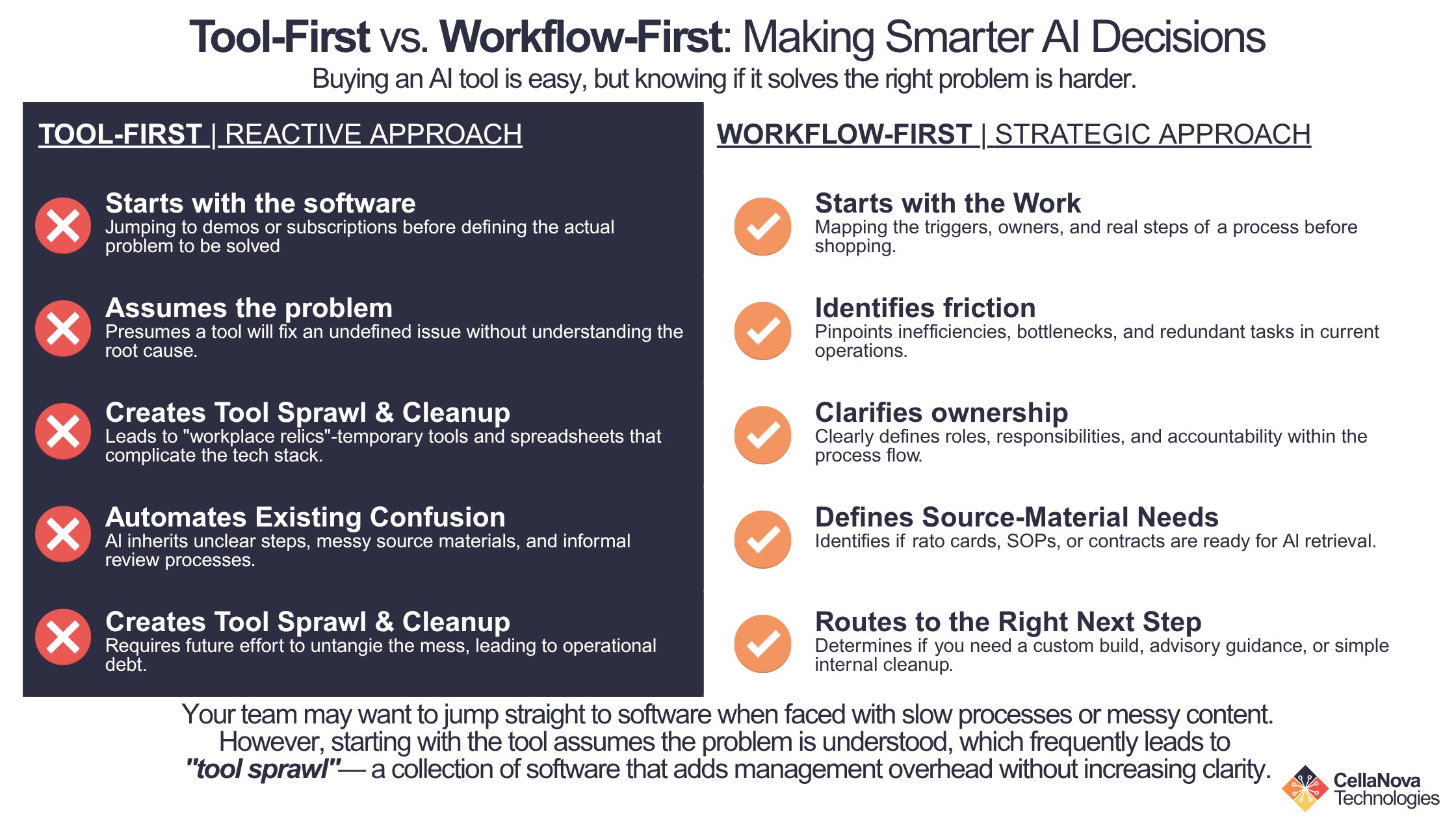
What work are we trying to improve?
Who does that work today?
What inputs do they use?
What decisions do they make?
What outputs do they produce?
What has to be reviewed?
What causes delay, rework, or inconsistency?
What would “better” actually look like?
Once those answers are clear, tool choices become easier. Without those answers, the team is guessing. And guessing with software budget is a sport no one should play professionally.
Workflow Mapping Reveals the Real Problem
Teams often think their problem is one thing when it is actually another.
A team may think it needs a pricing calculator, when the real problem is that rate cards, supplier sheets, and margin rules are scattered across five places.
A team may think it needs an AI writing assistant, when the real problem is that past proposals are not searchable and approved content is mixed with outdated language.
A team may think it needs automation, when the real issue is unclear ownership or missing review steps.
A team may think it needs a custom build, when a smaller advisory engagement, documentation cleanup, or tool configuration would be enough.
Workflow mapping surfaces those distinctions. It helps separate symptoms from causes.
The symptom may be slow quoting. The cause may be source-material confusion.
The symptom may be repeated proposal rewriting. The cause may be an ungoverned response archive.
The symptom may be too much manual admin.The cause may be a process with unclear handoffs.
If the team only solves the symptom, the problem comes back in a nicer interface.
What to Map Before Choosing an AI Tool
A good workflow map does not have to be complicated. It should answer practical questions.
1. What triggers the workflow?
Every workflow starts somewhere.
A client request.
A new RFP.
A form submission.
A sales inquiry.
A pricing update.
A meeting.
A document upload.
An internal request.
Knowing the trigger matters because it defines where the workflow begins and what the system may need to capture.
2. Who owns the workflow?
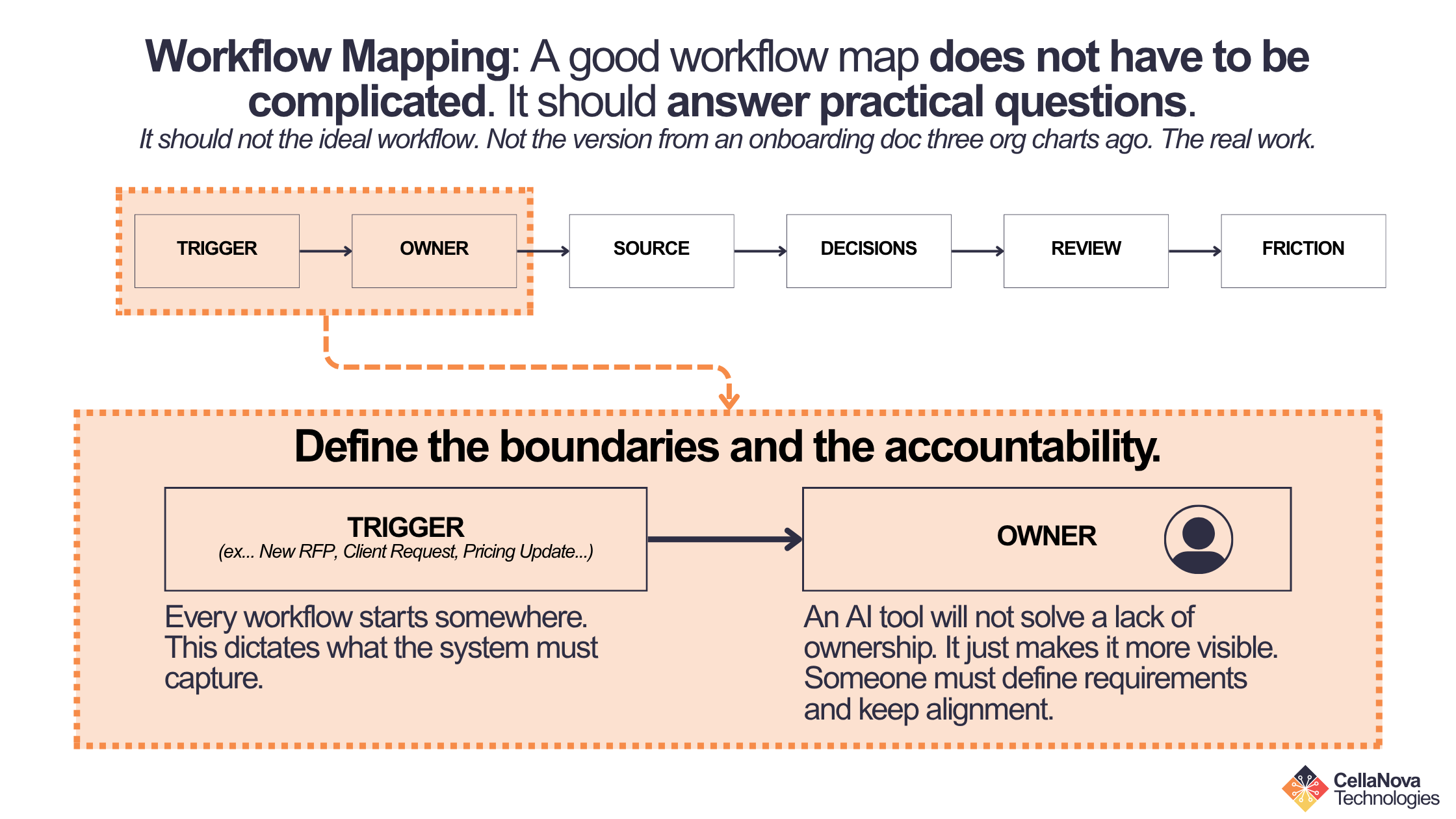
Someone needs to own the process. That does not mean they do every task. It means they understand the workflow well enough to define requirements, review decisions, and keep the process aligned.
If no one owns the workflow, an AI tool will not solve that. It may simply make the lack of ownership more visible.
3. What source material does the workflow depend on?
AI systems need source material if they are going to retrieve, summarize, or generate anything grounded in the business. That source material may include:
Rate cards
Past proposals
Spreadsheets
SOPs
Client documents
Templates
Contracts
Compliance language
Case studies
Emails
Internal policies
Knowledge from experienced team members
If the source material is scattered, outdated, or unclear, the team may need source-material readiness work before a build.
4. What decisions happen inside the workflow?
Workflows are not just task lists. They include decisions.
Should we respond to this RFP?
Which source document applies?
Does this quote need approval?
Which answer should we reuse?
Does this output need review?
Is this customer request in scope?
Should this be escalated?
Those decisions need to be mapped because they determine where human judgment belongs. AI can support decisions. It should not quietly own decisions the team has not defined.
5. What gets reviewed or approved?
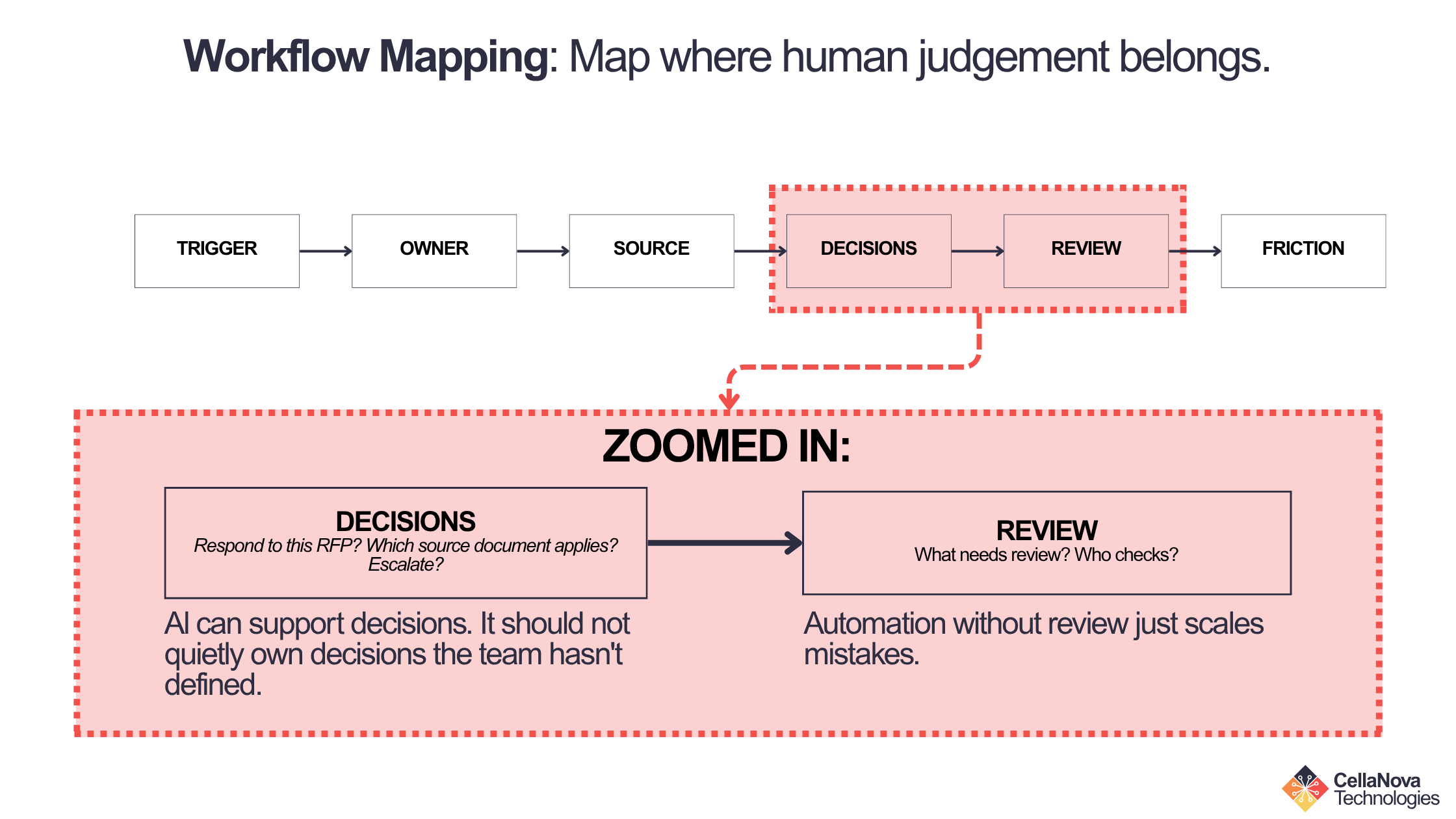
Review is where many workflows break down. The team should know:
What needs review?
Who reviews it?
When do they review it?
What are they checking?
What happens if something fails review?
Who gives final approval?
If review is vague today, automation can make it worse. A mapped workflow helps define where human-in-the-loop checkpoints belong.
6. Where does the workflow slow down?
This is where the opportunity usually lives. The team may lose time to:
Manual lookup
Rewriting repeated content
Version confusion
Copy/paste work
Waiting on one person
Unclear approvals
Duplicated effort
Tool switching
Missing source documents
Reviewer bottlenecks
These friction points help determine whether the team needs a managed build, advisory support, or a lighter process improvement.
Not Every Workflow Needs a Managed Build
This is important. A mapped workflow may reveal that a custom system is not the right next step. That is not bad news. It is useful news.
Some teams need a managed build because they have a recurring, source-heavy workflow with real business value and a clear owner. CellaNova Technologies’ managed build path is designed for teams with recurring workflows, real source material, a workflow owner, and likely intent to invest.
Other teams need advisory first. They may need help choosing tools, organizing source material, mapping the process, prioritizing use cases, or deciding whether a build is worth it. CellaNova Technologies’ AI Workflow Advisory service is specifically positioned for teams that need clarity before committing to a managed system.
And some teams are not ready yet.
No source material.
No recurring workflow.
No workflow owner.
No realistic business case.
No need for a managed system.
The point is not to force every workflow into a build. The point is to make the right decision.
Advisory Is for Teams That Need Clarity First
AI Workflow Advisory exists because many teams are not ready to build yet — and that is perfectly normal.
They may know AI could help, but they are not sure where.
They may have too many tool options.
They may have messy source material.
They may need an internal action plan.
They may need help deciding whether to build, build later, or not build at all.
CellaNova’s advisory model is fixed-scope and deliverable-based, with no open-ended retainer creep baked into the work. The current offerings include a 90-minute AI Workflow Session with an Action Memo, a deeper AI Workflow Diagnostic with workflow mapping, source-material review, readiness scoring, prioritized use cases, and an Advisory Artifact, and Fractional AI Advisory for ongoing guidance.
That structure matters. The point is not to “talk about AI” endlessly. The point is to leave with a useful next move.
Workflow Mapping Helps Avoid Tool Sprawl
Tool sprawl happens when teams keep adding tools without clarifying the workflow.
One tool for drafting.
Another for project management.
Another for notes.
Another for search.
Another for automation.
Another for documents.
Another because someone watched a webinar and got inspired. Dangerous stuff, webinars.
Eventually, the team has more software but not more clarity. Workflow mapping helps prevent that by identifying what the team actually needs the tool to do.
Does the team need retrieval? Drafting? Review routing? Source-library cleanup? Automation between systems? A checklist? A better template? A governed knowledge system? A simple internal SOP?
The answer changes the tool choice. Sometimes the right move is not adding a new platform. Sometimes it is using the existing tools better.
Workflow Mapping Makes AI Safer
AI can make bad workflows faster. That is not the goal.
If a team automates unclear steps, the system may produce outputs no one owns. If it retrieves from messy source material, it may surface outdated content. If it drafts without review, it may create confident but unsupported answers. Workflow mapping reduces that risk. It helps define:
What the system can safely support
Where human review belongs
Which sources can be trusted
Which decisions need approval
Which outputs should never go directly to customers
Which workflows are not ready for automation
This is not anti-AI. It is responsible AI adoption.
The best AI systems do not remove accountability. They make accountability easier to manage.
A Simple Workflow Map Can Create Immediate Wins
The nice thing about workflow mapping is that it can help even before any software decision is made. A team may discover:
A source folder needs cleanup
A template is missing
A review owner is unclear
Two people are duplicating work
One approval step is unnecessary
An old document is still being reused
A recurring question should become a standard response
A simple checklist would prevent repeated mistakes
Those are real wins.
Not everything needs to become a platform. Sometimes the first improvement is operational clarity. Good, sturdy, unglamorous clarity. The kind that keeps teams from buying a shiny tool to solve a filing problem.
What Better Looks Like
After workflow mapping, the team should be able to describe the work more clearly.
Before: “We need AI to help with proposals.”
After: “We respond to 8–10 RFPs per quarter. Our past proposals are scattered across shared drives. We rewrite standard sections because approved content is hard to find. Reviewers are pulled in late. We need a governed response library and a clearer intake-to-submission workflow.”
_____
Before: “We need pricing automation.”
After: “Our estimators quote from supplier sheets, rate cards, and spec documents that change regularly. Pricing accuracy depends on one person knowing which source is current. We need to assess source-material readiness and define a governed retrieval workflow.”
_____
Before: “We need an AI tool.”
After: “We need to map one workflow, review source material, identify friction points, and decide whether the next step is advisory, a Blueprint, or internal cleanup.”
_____
That is progress. The problem becomes easier to solve because it is finally named correctly.
Final Thought
Before buying another AI tool, map the workflow. That one step can save a team from overbuilding, underbuilding, choosing the wrong platform, or automating a process no one has clearly defined.
AI can help with real business workflows. But the workflow needs to be understood first.
Map the trigger.
Map the owner.
Map the source material.
Map the decisions.
Map the review points.
Map the friction.
Then decide what kind of support fits.
Maybe the team is ready for a managed build. Maybe it needs AI Workflow Advisory first. Maybe it needs cleanup, documentation, or a lighter internal next step. The best AI decision is not always “buy the tool.” Sometimes the best decision is to understand the work well enough to choose wisely.
Before you buy another AI tool or scope a custom system, map the workflow first.
Start with a Solution Fit Call. CellaNova will help determine whether your team needs AI Workflow Advisory, a Managed Knowledge System Blueprint, or a lighter next step.
-
Workflow mapping helps teams understand the real problem, identify source materials, clarify ownership, define review points, and avoid buying software that does not fit the process.
-
An AI workflow map should include the trigger, workflow owner, source materials, key decisions, review checkpoints, approval path, bottlenecks, repeated tasks, and desired outputs.
-
AI Workflow Advisory is often better when the team needs tool guidance, workflow design, source-material readiness, use-case prioritization, or internal planning before committing to a build.
-
No. Workflow mapping is part of responsible AI planning. It helps determine whether the team needs a managed build, advisory support, or a lighter internal next step.
